The family location sharing app everyone says yes to

Easy enough for Grandma. Cool enough for your teen.

One map the whole family can actually use — on any phone, tablet, or laptop, with nothing to install. Want the app? It’s there, always in sync. Real faces and street addresses, not a row of dots.

Free for 7 days·Cancel anytime·SOS is free, forever

9:41
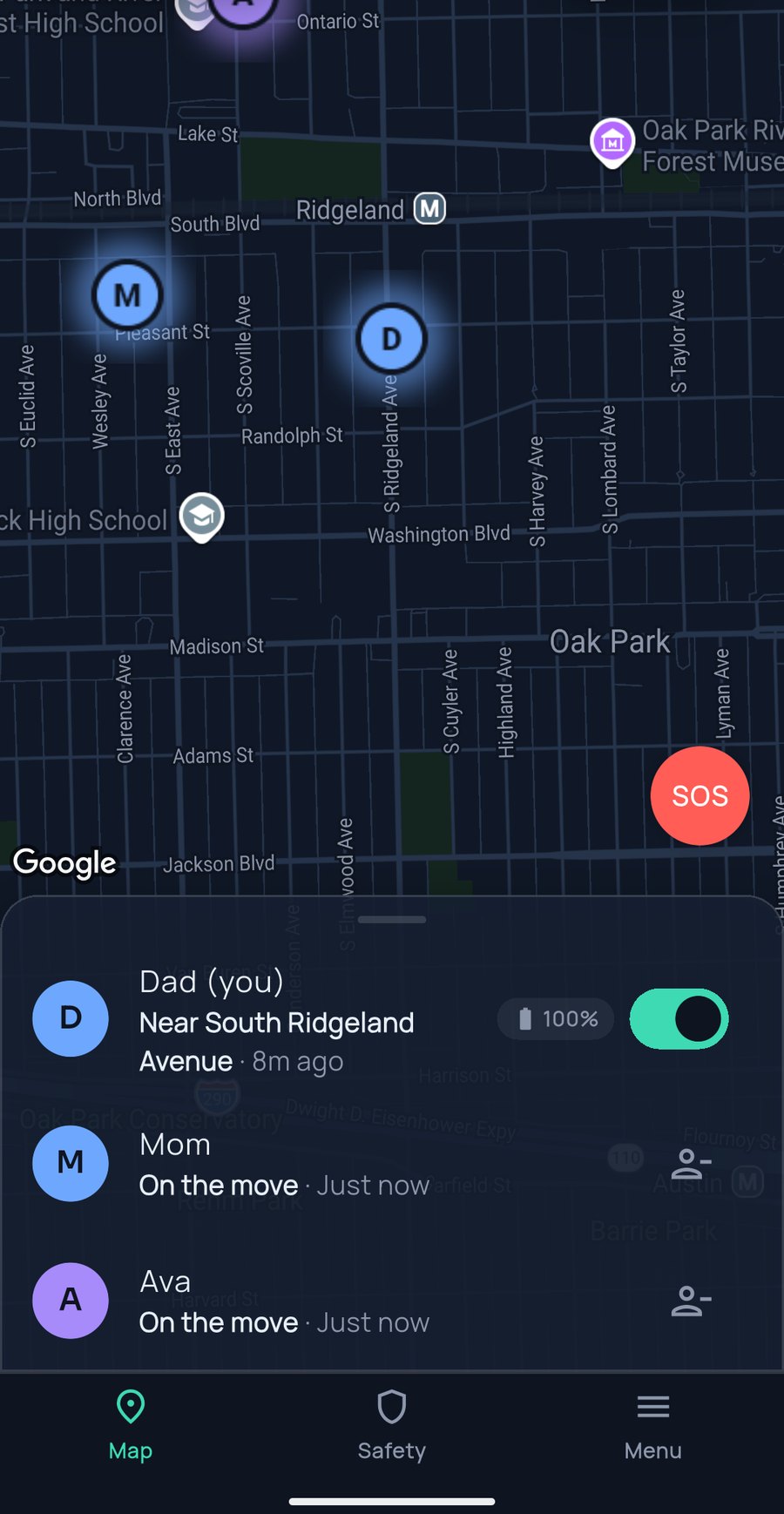
The FamilySeen live family map with Dad, Mom and Ava around Oak Park
Totally privateEveryone controls their own location — pause sharing anytime, no questions.
Nothing to installUse it in any browser — the app’s there too, if you want it.
All phones & carriersiPhone, Android, any carrier. Everyone’s welcome.
Super preciseLive location that updates in under a second.
Works everywhereIn the car, at school, across the country — the map keeps up.
Up and running in a minute

Three steps. Joining takes one tap.

Most family apps lose Grandma at the app store. With FamilySeen, no one has to install anything — you get the app if you want it, everyone else just opens it in their browser.

Create your circle

One circle for the whole family. You’re the owner.

Add them by phone number

Type a phone number and we text the invite — or share a QR or link instead. They join with just their name: no account, no download.

Everyone appears on the map

Each person flips their own “Share” switch — and the map fills up.

Know they’re safe

The alerts that let you stop asking.

SOS — free on every plan

Hold 3 seconds — everyone sees a red alert with your live location. Safety’s never behind a paywall.

Always free — every plan

Places & arrival alerts

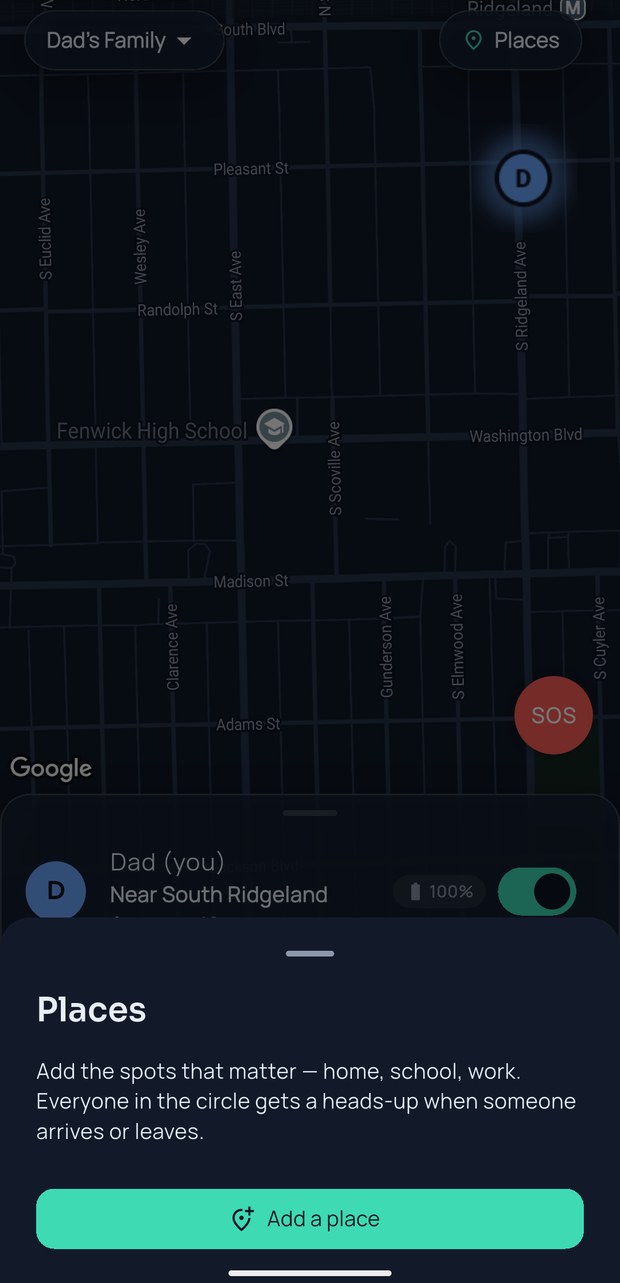
Save Home, School, Grandma’s — a gentle note on every arrival. No more “landed?” texts.

Free: 2 places · Premium: 20

Low battery alerts

Below 15%, the circle hears about it — before the dot goes dark, not after.

Always free — like SOS

Quiet alerts

Phone dies or loses signal? A quiet alert with the last known place — so you know it’s the phone, not the person.

9:41
Saved places and arrival alerts on the FamilySeen map, with the free SOS button
Say hi, gently

Two taps that replace a hundred texts.

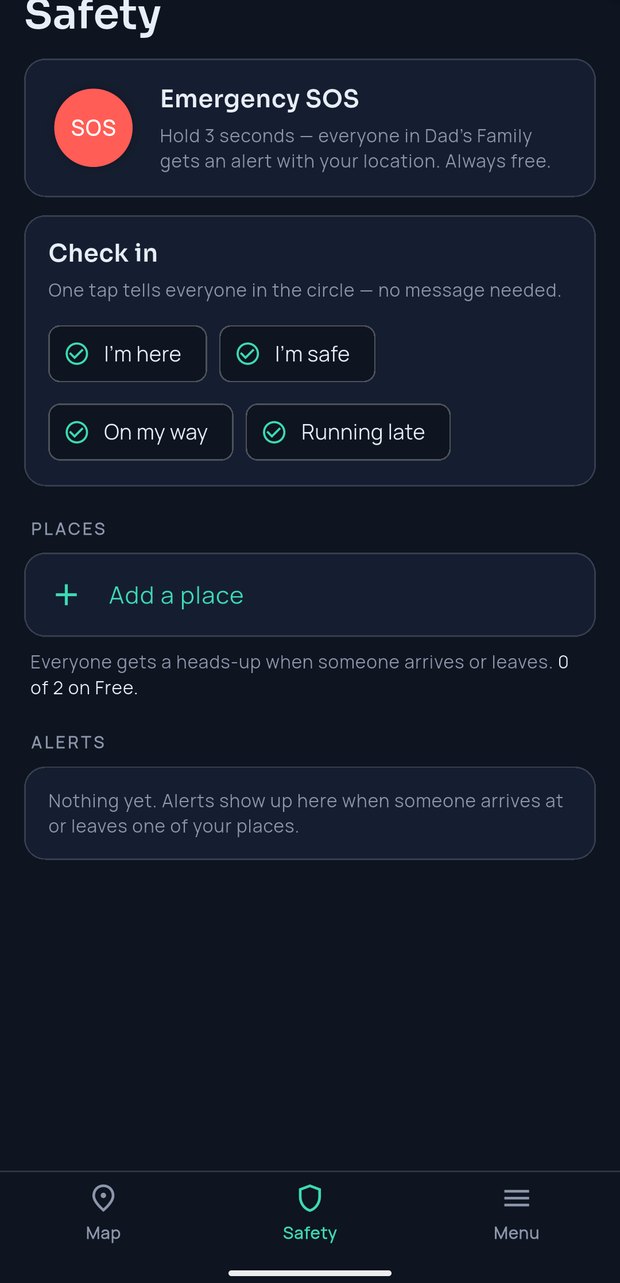
Check-In — one tap says “I’m OK”

Made it? Tap once. Everyone sees “Ava checked in — Riverside Hotel, 9:14 PM.” No group chat, nothing to remember.

Ping — asks, never takes

Dot gone quiet? Send a ping — a nudge, not a demand. It never grabs their location; they appear only when they say yes.

9:41
FamilySeen Safety tab — one-tap Check-in: I'm here, I'm safe, On my way, Running late
See the day

A map that reads like a family, not a spreadsheet.

A real address, not just a dot

Every chip shows a real street — “12 Maple St” — or “On the move.” The map reads like a story, not a puzzle.

Real faces on the map

Everyone adds their own photo, so Grandma sees Ava’s face, not a letter in a circle.

Location history that forgets

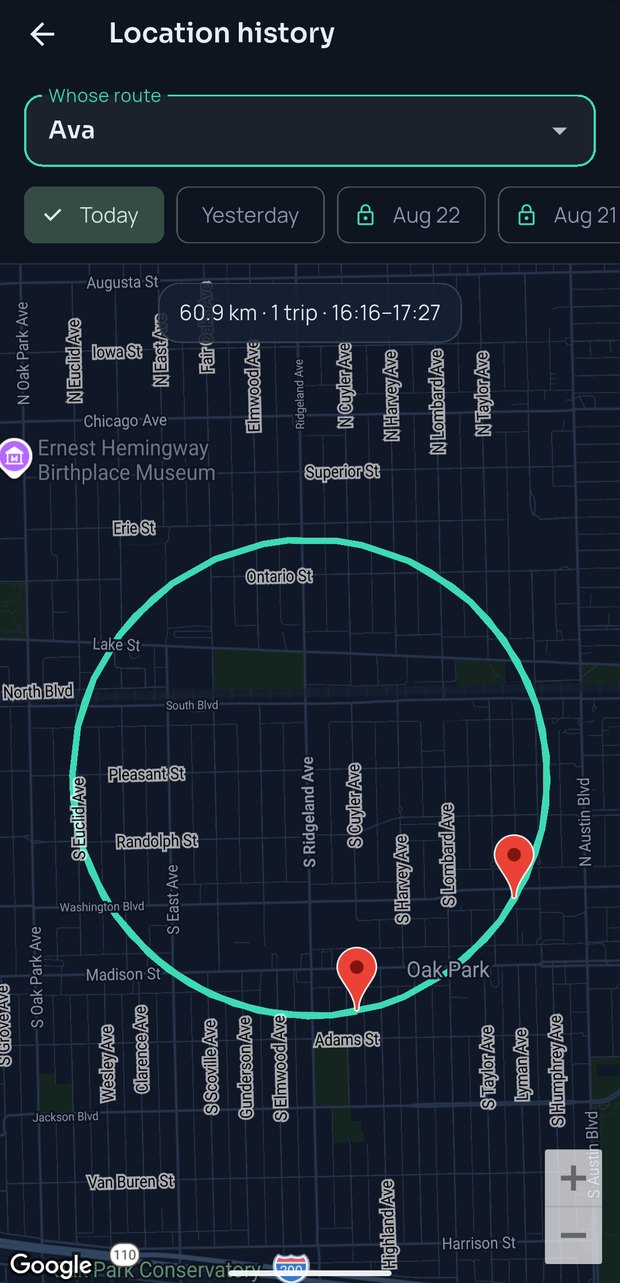
Each day, a summary — distance, trips, time at each place — and a route to replay. Deleted automatically after 30 days.

Free: 2 days · Premium: 30 days
9:41
FamilySeen location history — a day’s route with distance, trips and time at places
Why families stick with it

A family location app only works if the whole family’s glad to be on it. So we built every detail around that — the warm little ping when someone makes it home.

Pricing

One plan. The whole family. Every device.

No tiers, no upsells. One subscription, up to 10 people — iPhone, Android, web.

$9.99/ month

Billed monthly. Cancel anytime.

One person pays. Everyone else joins free — up to 10 people.
  • Live map — iPhone, Android & web
  • Up to 10 family members
  • Up to 20 places with arrival alerts
  • 30 days of location history
  • Check-in, ping & quiet alerts
  • SOS & low-battery — free for all
Start your 7-day free trial

7 days free, then your plan starts. Cancel in one tap — we’ll remind you before the trial ends.

Free for everyone — subscription or not

SOS alerts — alwaysLow-battery alertsLive demo — before inviting anyone
Questions, answered straight

Frequently asked

Will my teenager actually agree to use this?
Because everyone sees the same map — you appear to your kids exactly the way they appear to you — and anyone can pause anytime. Fair is what gets used.
Does my whole family need to install an app and create accounts?
No — nobody has to install anything. Everyone can use it right in the browser with just their name; the app is optional and stays in sync. No accounts, no app store.
What makes FamilySeen different from other location sharing apps for family use?
Three things. It works on any device with nothing to install — a kid’s tablet, Grandma’s old laptop, any Android or iPhone. History deletes itself after 30 days and is never sold. And a ping asks instead of takes. Plenty of apps do live maps; we sweat the part where everyone’s glad to be on one — a family safety app the whole family actually keeps.
What’s a check-in?
One tap that tells your circle “I’m OK”, with where you are and the time. It never changes your sharing.
What happens if someone’s phone dies or loses signal?
Their dot goes quiet and you get a quiet alert with the last known place — so you know it’s the phone, not the person. Low-battery alerts usually come first. A pause shows as “Paused” — we never blur the two.
What happens when someone pauses sharing?
Their dot leaves within seconds and the circle sees “Paused sharing.” Sharing resumes only when they switch it back.
Why do you ask for a card if the trial is free?
So your map doesn’t stop mid-week. Pay nothing for 7 days, we email before it ends, cancel in one tap.
What do you do with our location data?
Stored 30 days for history, then auto-deleted at the database level. Never sold. Our only revenue is your subscription, so you’re the customer, not the product.
More questions? The full FAQ answers them straight.

FamilySeen

Everyone home safe. Starting tonight.

Free for 7 days · Cancel anytime · SOS free forever

Start on any device — everything stays in sync